
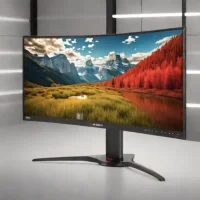
description LG UltraGear 34GP85U Overview
The LG UltraGear 34GP85U is a highly regarded 34-inch ultrawide monitor offering a fantastic balance of performance and value. Its 3440x1440 resolution, 144Hz refresh rate (overclockable to 160Hz), and 1ms response time deliver smooth and responsive gameplay. The Nano IPS panel provides excellent color accuracy and wide viewing angles. It supports both NVIDIA G-Sync and AMD FreeSync Premium Pro, ensuring tear-free gaming.
A solid all-around choice for gamers seeking an immersive experience without breaking the bank.
help LG UltraGear 34GP85U FAQ
How do I overclock the LG UltraGear 34GP85U to 160Hz?
To achieve the maximum 160Hz refresh rate, you need to access the monitor's On-Screen Display menu and turn on the 'Extreme' mode in the overclocking settings. After enabling it, you must also go into your PC's NVIDIA Control Panel or AMD Radeon Settings and set the custom resolution to 160Hz. This ensures you are getting the absolute smoothest motion possible for competitive gaming.
What is the difference between the LG 34GP85U and the older 34GP850?
The 34GP85U is largely a minor, refreshed iteration of the highly popular 34GP850-B model. The primary difference is a slight bump in the overclockable refresh rate, pushing the limit from 144Hz to 160Hz out of the box. Other than that, both monitors share the exact same Nano IPS panel, 1ms response time, and ergonomic stand.
Does the LG UltraGear 34GP85U suffer from IPS glow or backlight bleeding?
Like most fast IPS monitors, the 34GP85U does exhibit some level of IPS glow, which is highly visible in completely dark rooms. This is an inherent limitation of the display technology required to achieve the fast 1ms response time. However, during daytime use or in well-lit gaming environments, the glow is rarely noticeable.
Is the LG UltraGear 34GP85U good for productivity and multitasking?
Yes, the 34-inch ultrawide screen provides a massive 3440 x 1440 resolution that is fantastic for productivity work. The 21:9 aspect ratio allows you to easily place two full-sized windows side-by-side without needing a dual monitor setup. The built-in Picture-by-Picture feature also lets you view inputs from two different computers simultaneously.
explore Explore More


Reviews & Comments
Write a Review
Be the first to review
Share your thoughts with the community and help others make better decisions.


