
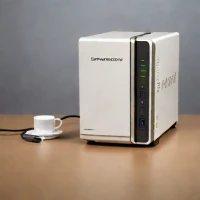
description TerraMaster D2-300 Overview
This 2-bay unit is perfect for the absolute beginner or for setting up a secondary, low-stakes backup location. It provides the core functionalityRAID protection for two drivesat the lowest possible entry cost. While it lacks the advanced features of the 4-bay models, it fulfills the primary need: keeping two critical drives safe from failure.
help TerraMaster D2-300 FAQ
Is the TerraMaster D2-300 a true NAS with apps, or just a USB drive enclosure?
Despite the storage category, the D2-300 is a direct-attached (DAS) unit — it connects to one computer over USB with no Ethernet or TerraMaster TOS app platform. That's why it costs far less than a true 2-bay NAS like TerraMaster's F2 series.
How do I set the RAID mode on the TerraMaster D2-300?
It uses physical DIP switches on the back to select between single-disk, RAID 0, and RAID 1 modes, then you re-power the unit. RAID 1 mirrors your two drives so one copy survives a drive failure, which is the usual choice for backups.
What connection speed and drives does the D2-300 support?
It connects over a USB 3.x Type-B link in the 5 Gbps class, using standard 3.5-inch SATA hard drives (and 2.5-inch drives/SSDs), sold diskless. Real throughput is more than enough to saturate spinning hard drives for large backup jobs.
Can I use the TerraMaster D2-300 as a Time Machine backup drive for my Mac?
Yes — once formatted appropriately (HFS+ or APFS for Time Machine), macOS sees it as a regular external disk. Set RAID 1 first if you want your Mac backups mirrored across both drives for extra safety.
explore Explore More



Reviews & Comments
Write a Review
Be the first to review
Share your thoughts with the community and help others make better decisions.


