
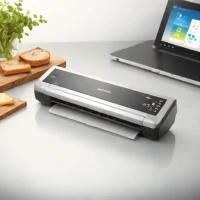
description Canon imageFORMULA R10 Overview
The Canon imageFORMULA R10 is a portable scanner designed for professionals needing immediate digitization of documents. It offers duplex scanning, allowing simultaneous capture on both sides of a page. Integrated OCR software converts scanned images to searchable text. Its compact design and wireless connectivity enable convenient scanning and direct transfer to computers or cloud services, ideal for field work, small businesses, and anyone requiring rapid document conversion.
help Canon imageFORMULA R10 FAQ
Does the Canon imageFORMULA R10 scan both sides in one pass?
Yes, it performs single-pass duplex scanning, capturing the front and back without feeding the sheet twice. Canon rates black-and-white and grayscale scanning at up to 12 pages per minute.
Do I need to install software before using the R10?
The scanner includes Canon's CaptureOnTouch Lite software in its internal storage. On a supported Windows or macOS computer, it is intended to launch over USB without a conventional software installation.
How many pages fit in the R10's document feeder?
The automatic feeder holds up to 20 sheets of ordinary paper. Canon suggests a daily volume of up to 500 scans, making it more appropriate for mobile or small-office batches than high-volume archives.
Can the imageFORMULA R10 scan photographs like a flatbed?
It can scan compatible loose sheets at up to 600 dpi optical resolution, but every item must travel through a sheet-fed mechanism. Fragile prints, bound pages and irreplaceable photographs are safer on a flatbed scanner.
explore Explore More
Similar to Canon imageFORMULA R10
compare_arrows Compare: Epson WorkForce ES-300W See all arrow_forward


Reviews & Comments
Write a Review
Be the first to review
Share your thoughts with the community and help others make better decisions.


