
description Lexar JumpDrive USB-C Overview
The Lexar JumpDrive USB-C is a dedicated Type-C flash drive designed for modern laptops and mobile devices. It provides a convenient way to transfer files directly from your smartphone or tablet to your computer without needing an adapter. Its compact design and reliable performance make it a great choice for users who primarily use USB-C ports.
help Lexar JumpDrive USB-C FAQ
Can the Lexar JumpDrive USB-C connect directly to an Android phone?
A USB-C JumpDrive can connect directly to an Android phone that supports USB OTG and has a compatible file manager. The phone must also have enough available power and storage access for the drive to appear.
Does the Lexar JumpDrive USB-C need an adapter for a USB-C laptop?
No adapter is needed when both the drive and the laptop use USB-C. Some JumpDrive models are dual-drive versions with both USB-C and USB-A connectors, which also makes them useful with older computers.
How fast is the Lexar JumpDrive USB-C?
Speed depends on the exact JumpDrive model, because the range includes USB 3.2 Gen 1 products and other designs. For example, Lexar identifies the JumpDrive Dual Drive E32c as a USB 3.2 Gen 1 Type-C drive, so it should not be confused with Lexar's faster portable SSD products.
Which files can I transfer with a Lexar JumpDrive USB-C?
You can use it for documents, photos, videos, and other ordinary files supported by the phone and computer. On Android, the practical limit is often the phone's file system and app support rather than the USB-C connector itself.
explore Explore More
Similar to Lexar JumpDrive USB-C
compare_arrows Compare: SanDisk Ultra Dual Drive Go See all arrow_forward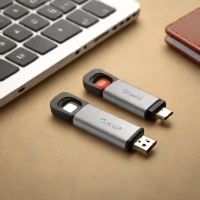


Reviews & Comments
Write a Review
Be the first to review
Share your thoughts with the community and help others make better decisions.


