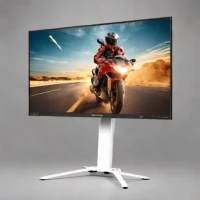
description MSI G274QPF Overview
The MSI G274QPF is a fantastic 'Rapid-IPS' monitor that bridges the gap between gaming speed and creative color accuracy. With a wide color gamut covering 147% of the sRGB space, it is surprisingly capable for photo and video editing, while the 170Hz refresh rate ensures a smooth gaming experience. It is a sleek, modern-looking display with thin bezels that look great in any setup. If you are a content creator who also enjoys gaming, this monitor offers the best of both worlds without breaking your budget.
info MSI G274QPF Specifications
| Brightness | 400 nits (HDR400) |
| Panel Type | Rapid IPS |
| Resolution | 2560 x 1440 (QHD) |
| Vesa Mount | 100x100mm |
| Color Gamut | 147% sRGB, 94% DCI-P3 |
| Screen Size | 27 inches |
| Connectivity | 1x DisplayPort 1.2, 2x HDMI 2.0b, 1x USB-C (15W PD), 2x USB 2.0 |
| Refresh Rate | 170Hz |
| Adaptive Sync | NVIDIA G-Sync Compatible, AMD FreeSync Premium |
| Response Time | 1ms (GtG) |
| Contrast Ratio | 1000:1 |
| Viewing Angles | 178° (H/V) |
| Stand Adjustment | Height, Tilt, Swivel, Pivot |
balance MSI G274QPF Pros & Cons
- Rapid IPS panel delivers excellent color accuracy with wide viewing angles suitable for both gaming and creative work
- 170Hz refresh rate combined with 1ms (GtG) response time provides smooth, blur-free gaming performance
- 147% sRGB color gamut coverage enables accurate color work for photo and video editing
- NVIDIA G-Sync Compatible and AMD FreeSync Premium support eliminates screen tearing
- Fully adjustable stand with height, tilt, swivel, and pivot for ergonomic positioning
- USB-C connectivity with DisplayPort Alt Mode and 15W power delivery for modern device compatibility
- IPS panel exhibits noticeable glow/bleeding at screen edges, particularly visible during dark content
- Native sRGB mode lacks factory calibration, requiring manual adjustment for optimal color accuracy
- No built-in speakers, necessitating external audio solutions
- HDR400 certification provides limited HDR impact compared to higher-tier displays
- Peak brightness of 400 nits may feel insufficient in brightly lit environments
help MSI G274QPF FAQ
What panel type does the MSI G274QPF use and how does it compare to standard IPS?
The G274QPF uses a Rapid IPS panel, which offers 4x faster response times than conventional IPS panels while maintaining the same excellent color accuracy and wide 178-degree viewing angles. This makes it better suited for fast-paced gaming without sacrificing image quality.
Does the MSI G274QPF support both NVIDIA and AMD adaptive sync?
Yes, the MSI G274QPF is NVIDIA G-Sync Compatible certified and supports AMD FreeSync Premium. This means you get tear-free gaming regardless of whether you use an NVIDIA or AMD graphics card, with certified performance standards.
What is the native resolution and is it good for console gaming?
The monitor features a native 2560x1440 (QHD) resolution on its 27-inch panel, providing sharp imagery. While it lacks HDMI 2.1 for 4K/120Hz console output, the 1440p resolution and 170Hz via DisplayPort make it excellent for PC gaming and supports 120Hz on newer consoles via HDMI.
Can the MSI G274QPF be mounted on a VESA stand or arm?
Yes, the G274QPF includes a 100x100mm VESA mount pattern, allowing you to replace the included adjustable stand with any compatible VESA wall mount or monitor arm for more flexible positioning.
What is MSI G274QPF?
How good is MSI G274QPF?
What are the best alternatives to MSI G274QPF?
What is MSI G274QPF best for?
Budget-conscious gamers and content creators seeking a versatile 27-inch QHD monitor that excels at both fast-paced gaming and color-accurate work.
How does MSI G274QPF compare to Dell UltraSharp U4025QW?
Is MSI G274QPF worth it in 2026?
What are the key specifications of MSI G274QPF?
- Brightness: 400 nits (HDR400)
- Panel Type: Rapid IPS
- Resolution: 2560 x 1440 (QHD)
- VESA Mount: 100x100mm
- Color Gamut: 147% sRGB, 94% DCI-P3
- Screen Size: 27 inches
explore Explore More
Similar to MSI G274QPF
See all arrow_forwardReviews & Comments
Write a Review
Be the first to review
Share your thoughts with the community and help others make better decisions.