
description Plask.ai Overview
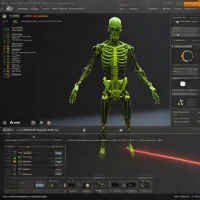
Plask.ai is an innovative platform that uses AI to convert video footage into 3D motion capture data. Users record themselves performing actions, and Plask's AI algorithms analyze the video to generate a skeletal rig and animation data that can be exported to popular 3D animation software. This eliminates the need for expensive motion capture suits and studios, making high-quality motion capture accessible to a wider range of creators. Its ideal for game developers, animators, and filmmakers looking to create realistic character animations quickly and affordably.
help Plask.ai FAQ
How does Plask.ai capture motion from a video?
Plask.ai uses browser-based AI algorithms to analyze standard 2D video footage and track the movements of a human subject. It then translates these movements into 3D skeletal motion capture data without requiring specialized sensor suits. Users simply upload their video, and the platform automatically generates an animated rig.
What file formats can I export from Plask.ai for my 3D animations?
Plask allows users to export their finalized motion capture animations in formats compatible with major 3D software like Blender, Maya, and Cinema 4D. Typically, this means you can export your files to standard formats like FBX or BVH. This makes it easy to drop the captured motion directly onto character models in your preferred workflow.
Can Plask.ai track multiple people in the same video?
Plask's AI is optimized primarily for tracking a single human subject performing actions in the frame to ensure the highest accuracy of the skeletal rig. While multi-person tracking is a complex challenge in AI mocap, the platform excels at isolating one prominent figure. Users typically process multiple characters by running separate videos sequentially.
Do I need a powerful computer to run Plask.ai?
No, because Plask.ai performs its heavy computational lifting in the cloud, it can be accessed directly through a standard web browser. This means you do not need an expensive dedicated GPU or high-end desktop to process the motion capture data. You just need a stable internet connection to upload your video files.
explore Explore More



Reviews & Comments
Write a Review
Be the first to review
Share your thoughts with the community and help others make better decisions.


