
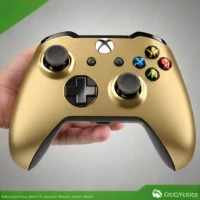
description Xbox Wireless Controller (Latest Revision) Overview
This is the current, official iteration of the Xbox Wireless Controller, offering the best out-of-the-box compatibility for the Xbox One platform. It features improved grips and reliable wireless connectivity, making it a significant upgrade over the original model without the complexity of the Elite series. It provides a perfect balance of professional feel, reliability, and accessibility for the vast majority of Xbox One users.
help Xbox Wireless Controller (Latest Revision) FAQ
What is the difference between the latest Xbox Wireless Controller and the Elite Series 2?
The latest standard Xbox Wireless Controller features improved grips and reliable wireless connectivity, but lacks the premium metal components of the Elite Series 2. The Elite Series 2 offers adjustable tension thumbsticks, back paddles, and interchangeable D-pads that the standard controller lacks.
Does the new Xbox Wireless Controller have Bluetooth for PC?
Yes, the latest revision of the Xbox Wireless Controller includes native Bluetooth support for seamless pairing with Windows 10 and 11 PCs. This makes it a massive upgrade over the original Xbox One model, offering the best out-of-the-box compatibility.
Can I use a USB-C cable to play wired on the new Xbox controller?
Yes, the controller features a USB-C port that allows you to play wired while simultaneously charging the AA batteries or rechargeable battery pack. Playing wired also reduces input latency, which is ideal for competitive gaming on an Xbox Series X.
Does the new Xbox Wireless Controller have a share button?
Yes, the latest revision of the controller introduces a dedicated share button right in the center of the faceplate. This allows players to instantly capture screenshots and video clips without navigating through the Xbox dashboard.
explore Explore More
Similar to Xbox Wireless Controller (Latest Revision)
compare_arrows Compare: Xbox Elite Controller Series... See all arrow_forward


Reviews & Comments
Write a Review
Be the first to review
Share your thoughts with the community and help others make better decisions.


