
description Apple Magic Keyboard Overview
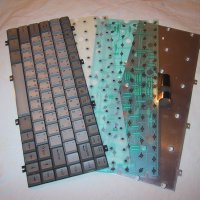
The Apple Magic Keyboard is the quintessential choice for Mac users who value simplicity and integration. Its ultra-thin design and scissor-switch mechanism provide a snappy, consistent typing experience that is perfectly tuned for macOS. With its long-lasting battery and seamless pairing with Apple devices, it is the most 'it just works' keyboard on the market. While it lacks the tactile depth of mechanical boards, its reliability and portability are unmatched.
It is the perfect companion for an iPad or a Mac setup where desk space is at a premium and aesthetics are paramount.
info Apple Magic Keyboard Specifications
| Weight | 0.69 pounds (310 grams) |
| Key Type | Scissor-switch |
| Material | Aluminum, Plastic |
| Dimensions | 11.41 x 7.95 x 0.41 inches (290 x 202 x 10.5 mm) |
| Key Travel | 1.5 mm |
| Battery Life | Up to 1 month (typical use) |
| Connectivity | Bluetooth 5.0, Lightning/USB-C |
| Special Keys | Brightness, Volume, Siri, Eject (on older models) |
| Operating System Compatibility | macOS, iPadOS |
balance Apple Magic Keyboard Pros & Cons
- Seamless Integration: Effortlessly pairs with macOS and iOS devices, offering instant access to system functions and keyboard shortcuts.
- Scissor-Switch Mechanism: Provides a responsive and quiet typing experience with a noticeable tactile feedback, improving accuracy and comfort.
- Ultra-Thin and Minimalist Design: The sleek, low-profile design complements Apple's aesthetic and maximizes desk space.
- Long Battery Life: Offers up to one month of battery life on a single charge, minimizing the need for frequent charging.
- Smart Key Functionality: Dedicated function keys provide quick access to system controls like brightness, volume, and Mission Control.
- Automatic Pairing and Switching: Automatically connects to nearby Apple devices and seamlessly switches between them.
- Limited Customization: Offers minimal customization options compared to mechanical keyboards with programmable keys and RGB lighting.
- Price Point: Significantly more expensive than many third-party keyboard alternatives.
- No Backlighting: The lack of backlighting can be a disadvantage in low-light environments.
- Non-Replaceable Keycaps: Keycaps are not user-replaceable, limiting personalization and potential repair options.
- Proprietary Connector: Relies on a Lightning or USB-C connection, potentially limiting compatibility with non-Apple devices.
help Apple Magic Keyboard FAQ
Is the Apple Magic Keyboard compatible with Windows?
While it can function with Windows, the Magic Keyboard's full functionality, including special keys and system integration, is optimized for macOS. Some features may not work as expected.
How do I pair the Apple Magic Keyboard with my Mac?
The Magic Keyboard automatically pairs with your Mac via Bluetooth. Simply turn on the keyboard, and it should appear in your Mac's Bluetooth preferences for easy connection.
What is the battery life of the Apple Magic Keyboard?
Apple claims up to one month of battery life on a single charge with typical use. Actual battery life may vary depending on usage patterns and environmental factors.
Can I use the Apple Magic Keyboard with an iPad?
Yes, the Magic Keyboard is compatible with iPad Pro and iPad Air models. It magnetically attaches and provides a comfortable typing experience for tablet use, enhancing productivity.
What is Apple Magic Keyboard?
How good is Apple Magic Keyboard?
How much does Apple Magic Keyboard cost?
What are the best alternatives to Apple Magic Keyboard?
What is Apple Magic Keyboard best for?
The Apple Magic Keyboard is ideal for Mac and iPad users who prioritize a minimalist design, seamless integration, and a comfortable, quiet typing experience within the Apple ecosystem.
How does Apple Magic Keyboard compare to Logitech MX Mechanical?
Is Apple Magic Keyboard worth it in 2026?
What are the key specifications of Apple Magic Keyboard?
- Weight: 0.69 pounds (310 grams)
- Key Type: Scissor-switch
- Material: Aluminum, Plastic
- Dimensions: 11.41 x 7.95 x 0.41 inches (290 x 202 x 10.5 mm)
- Key Travel: 1.5 mm
- Battery Life: Up to 1 month (typical use)
explore Explore More
Similar to Apple Magic Keyboard
See all arrow_forward

Reviews & Comments
Write a Review
Be the first to review
Share your thoughts with the community and help others make better decisions.


