
description AudioQuest DragonFly Red Overview
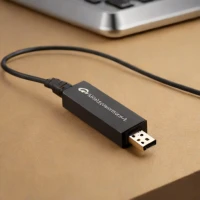
The AudioQuest Dragonfly Red is a compact digital-to-analog converter (DAC) and headphone amplifier. It’s notable for its ability to improve sound quality from portable devices like smartphones or laptops through USB connectivity. Designed for audiophiles and music listeners who value detail and clarity, it provides a convenient way to enjoy higher fidelity audio with headphones on the go.
help AudioQuest DragonFly Red FAQ
Can I use the AudioQuest DragonFly Red with my smartphone?
Yes, the DragonFly Red can be used with smartphones, but you will need a USB adapter (like Apple's Lightning-to-USB Camera Adapter for iPhones) since it features a standard USB-A connector. It is designed to draw minimal power, making it highly efficient for mobile listening on the go without draining your battery too quickly.
What headphones pair well with the DragonFly Red?
The device has an output impedance of 1 ohm and can deliver up to 2.1 volts, making it perfectly suited to drive sensitive in-ear monitors as well as most mid-range over-ear headphones. It operates using a high-quality ESS 9016 DAC chip to ensure clean, low-distortion audio playback.
Does the DragonFly Red support high-resolution audio formats?
Yes, the DAC supports PCM audio up to 24-bit/96kHz resolution, allowing you to play high-resolution lossless files from services like Apple Music or Qobuz. An LED indicator on the device changes color to show the current sample rate of the audio being played.
How does the DragonFly Red differ from the older Black version?
The Red version utilizes a more advanced ESS 9016 DAC chip and has a slightly higher output voltage of 2.1 volts compared to the DragonFly Black's 1.2 volts. This gives the Red model more overall volume and a better ability to drive slightly more demanding headphones.
explore Explore More
Similar to AudioQuest DragonFly Red
compare_arrows Compare: AudioQuest DragonFly Cobalt See all arrow_forward


Reviews & Comments
Write a Review
Be the first to review
Share your thoughts with the community and help others make better decisions.


