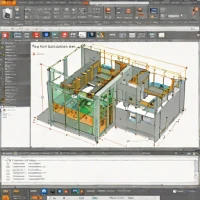
description AutoCAD Overview

AutoCAD is the foundational computer-aided drafting software, setting the standard for 2D precision drawing and documentation for decades. While it includes robust 3D tools, its core strength remains in creating detailed architectural plans, engineering schematics, and construction documents. Its extensive library of industry-specific toolsets (Architecture, Electrical, Map 3D) and powerful customization via LISP and APIs make it indispensable in AEC, manufacturing, and civil engineering. A subscription-based product from Autodesk, its unparalleled legacy, precision, and specialized vertical solutions secure its high rank for professional drafting and documentation workflows.

recommend Best for: AutoCAD is best suited for professional architects, engineers, and construction professionals requiring precise 2D and 3D design capabilities.

info AutoCAD Specifications

balance AutoCAD Pros & Cons

thumb_up Pros
  • check Industry-standard precision in 2D drawing
  • check Comprehensive set of drafting tools
  • check Extensive library of pre-built symbols and templates
  • check Strong community support and resources
thumb_down Cons
  • close Steep learning curve for beginners
  • close High cost compared to competitors
  • close Limited free version functionality
  • close Occasional software bugs and crashes

help AutoCAD FAQ

What is AutoCAD used for?

AutoCAD is primarily used for creating detailed architectural plans, engineering schematics, and construction documents.

Is there a free trial of AutoCAD?

Yes, Autodesk offers a free 30-day trial of AutoCAD to evaluate its features.

Does AutoCAD have mobile support?

AutoCAD has limited mobile support through the AutoCAD Mobile app for basic functions only.

What is AutoCAD?
AutoCAD is the foundational computer-aided drafting software, setting the standard for 2D precision drawing and documentation for decades. While it includes robust 3D tools, its core strength remains in creating detailed architectural plans, engineering schematics, and construction documents. Its extensive library of industry-specific toolsets (Architecture, Electrical, Map 3D) and powerful customization via LISP and APIs make it indispensable in AEC, manufacturing, and civil engineering. A subscription-based product from Autodesk, its unparalleled legacy, precision, and specialized vertical solutions secure its high rank for professional drafting and documentation workflows.
How good is AutoCAD?
AutoCAD scores 9.6/10 (Brilliant) on Lunoo, making it one of the highest-rated options in the Cad Software category. AutoCAD scores 8.9/10 due to its industry-standard precision and comprehensive set of drafting tools, but it is limited by a steep learning curve for...
How much does AutoCAD cost?
From $25/mo. Visit the official website for the most up-to-date pricing.
What are the best alternatives to AutoCAD?
See our alternatives page for AutoCAD for a ranked list with scores. Top alternatives include: DraftSight, Autodesk AutoCAD, Autodesk AutoCAD LT.
What is AutoCAD best for?

AutoCAD is best suited for professional architects, engineers, and construction professionals requiring precise 2D and 3D design capabilities.

How does AutoCAD compare to DraftSight?
See our detailed comparison of AutoCAD vs DraftSight with scores, features, and an AI-powered verdict.
Is AutoCAD worth it in 2026?
With a score of 9.6/10, AutoCAD is highly rated in Cad Software. See all Cad Software ranked.
What are the key specifications of AutoCAD?
  • API: Yes, with API access for custom development
  • Languages: English, Spanish, French, German, Japanese
  • Platforms: Windows, macOS
  • Integration: BIM 360, Revit, Inventor

Reviews & Comments

Write a Review

lock

Please sign in to share your review

rate_review

Be the first to review

Share your thoughts with the community and help others make better decisions.

Save to your list

Create your first list and start tracking the tools that matter to you.

Track favorites
Get updates
Compare scores

Already have an account? Sign in

Compare Items

See how they stack up against each other

Comparing
VS
Select 1 more item to compare