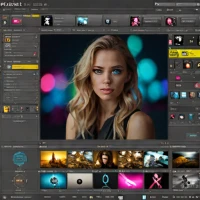
description Darktable Overview

Darktable is a free, open-source photography workflow application and RAW developer. It operates as a non-destructive editor with powerful organizational capabilities and a comprehensive set of modules for color correction, tonal adjustments, and creative effects. Its strength lies in its scientific approach to image processing and highly configurable module system. Targeted at technically-minded photographers and those avoiding proprietary software, it is completely free.

It scores well for its professional-grade RAW processing capabilities, active development, and commitment to a free, open workflow. It is a top-tier free alternative to Lightroom, especially for Linux users.

recommend Best for: Ideal for professional photographers and enthusiasts who require a robust and flexible photo editing solution.

info Darktable Specifications

balance Darktable Pros & Cons

thumb_up Pros
  • check non-destructive editing
  • check comprehensive set of modules
  • check open-source community support
  • check scientific approach to color correction
thumb_down Cons
  • close steep learning curve for beginners
  • close lack of native mobile app
  • close limited hardware acceleration on some systems
  • close complex interface can be overwhelming

help Darktable FAQ

Is Darktable free to use?

Yes, Darktable is completely free and open-source.

Does Darktable have a mobile version?

Currently, there is no official Darktable mobile app available.

Can I use Darktable on Windows?

Darktable supports multiple operating systems including Windows, macOS, and Linux.

What is Darktable?
Darktable is a free, open-source photography workflow application and RAW developer. It operates as a non-destructive editor with powerful organizational capabilities and a comprehensive set of modules for color correction, tonal adjustments, and creative effects. Its strength lies in its scientific approach to image processing and highly configurable module system. Targeted at technically-minded photographers and those avoiding proprietary software, it is completely free. It scores well for its professional-grade RAW processing capabilities, active development, and commitment to a free, open workflow. It is a top-tier free alternative to Lightroom, especially for Linux users.
How good is Darktable?
Darktable scores 8.0/10 (Very Good) on Lunoo, making it a well-rated option in the Photo Editing Software category. Darktable scores 8.0/10 due to its powerful features, open-source nature, and scientific approach to color correction. However, the steep learning cur...
How much does Darktable cost?
Free Plan. Visit the official website for the most up-to-date pricing.
What are the best alternatives to Darktable?
See our alternatives page for Darktable for a ranked list with scores. Top alternatives include: Affinity Photo 2, Pixelmator Pro, Adobe Photoshop CC.
What is Darktable best for?

Ideal for professional photographers and enthusiasts who require a robust and flexible photo editing solution.

How does Darktable compare to Affinity Photo 2?
See our detailed comparison of Darktable vs Affinity Photo 2 with scores, features, and an AI-powered verdict.
Is Darktable worth it in 2026?
With a score of 8.0/10, Darktable is highly rated in Photo Editing Software. See all Photo Editing Software ranked.
What are the key specifications of Darktable?
  • API: No public API available
  • Platform: Windows, macOS, Linux
  • Languages: Primarily developed in C++ with some Python scripting support
  • Integration: Supports various RAW formats, plugins, and scripts

Reviews & Comments

Write a Review

lock

Please sign in to share your review

rate_review

Be the first to review

Share your thoughts with the community and help others make better decisions.

Save to your list

Create your first list and start tracking the tools that matter to you.

Track favorites
Get updates
Compare scores

Already have an account? Sign in

Compare Items

See how they stack up against each other

Comparing
VS
Select 1 more item to compare