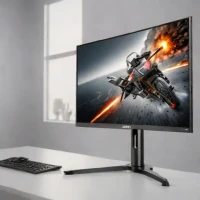
zoom_in Click to enlarge

description Gigabyte M27Q X Overview

The Gigabyte M27Q X delivers exceptional specs for its price, featuring a 27-inch 2560x1440 SS IPS panel with a 240Hz refresh rate. It includes a highly practical KVM switch and USB-C connectivity with 65W power delivery, making it ideal for users with multiple devices. Color coverage is strong at 94% DCI-P3. Aimed at gamers and hybrid workers who need a fast gaming display that doubles as a productivity hub, it offers tremendous value.

It scores highly for packing premium features like high refresh rate and KVM into a mid-range package, though its HDR and build quality are areas where costs were saved.

recommend Best for: This monitor is best suited for professional content creators and gamers who require sharp visuals and quick response times.

info Gigabyte M27Q X Specifications

balance Gigabyte M27Q X Pros & Cons

thumb_up Pros
  • check 240Hz refresh rate
  • check 95% DCI-P3 color coverage
  • check KVM switch included
  • check USB-C connectivity with 65W power delivery
thumb_down Cons
  • close Higher price point compared to lower refresh rate monitors
  • close Limited input lag for gaming
  • close No built-in speakers

help Gigabyte M27Q X FAQ

What is the resolution of the Gigabyte M27Q X?

The monitor features a 2560x1440 resolution, providing sharp and detailed visuals.

Does it have built-in speakers?

No, the monitor does not come with built-in speakers. You will need to connect external speakers or headphones for audio.

Is the KVM switch easy to use?

The KVM switch is user-friendly and allows you to easily switch between multiple devices without needing a separate keyboard or mouse.

What is Gigabyte M27Q X?
The Gigabyte M27Q X delivers exceptional specs for its price, featuring a 27-inch 2560x1440 SS IPS panel with a 240Hz refresh rate. It includes a highly practical KVM switch and USB-C connectivity with 65W power delivery, making it ideal for users with multiple devices. Color coverage is strong at 94% DCI-P3. Aimed at gamers and hybrid workers who need a fast gaming display that doubles as a productivity hub, it offers tremendous value. It scores highly for packing premium features like high refresh rate and KVM into a mid-range package, though its HDR and build quality are areas where costs were saved.
How good is Gigabyte M27Q X?
Gigabyte M27Q X scores 8.7/10 (Very Good) on Lunoo, making it a well-rated option in the Gaming Monitor category. The Gigabyte M27Q X scores 8.7/10 due to its impressive specs, including a high refresh rate and strong color coverage, but it comes with a higher pri...
How much does Gigabyte M27Q X cost?
From $499.99. Visit the official website for the most up-to-date pricing.
What are the best alternatives to Gigabyte M27Q X?
See our alternatives page for Gigabyte M27Q X for a ranked list with scores. Top alternatives include: LG 27GR95QE-B, LG 27GP850-B, ASUS ROG Swift PG27AQDM.
What is Gigabyte M27Q X best for?

This monitor is best suited for professional content creators and gamers who require sharp visuals and quick response times.

How does Gigabyte M27Q X compare to LG 27GR95QE-B?
See our detailed comparison of Gigabyte M27Q X vs LG 27GR95QE-B with scores, features, and an AI-powered verdict.
Is Gigabyte M27Q X worth it in 2026?
With a score of 8.7/10, Gigabyte M27Q X is highly rated in Gaming Monitor. See all Gaming Monitor ranked.
What are the key specifications of Gigabyte M27Q X?
  • Size: 27 inches
  • Panel Type: 2560x1440 SS IPS
  • Connectivity: USB-C (65W PD), HDMI, DisplayPort
  • Refresh Rate: 240Hz
  • Color Coverage: 95% DCI-P3

Reviews & Comments

Write a Review

lock

Please sign in to share your review

rate_review

Be the first to review

Share your thoughts with the community and help others make better decisions.

Save to your list

Create your first list and start tracking the tools that matter to you.

Track favorites
Get updates
Compare scores

Already have an account? Sign in

Compare Items

See how they stack up against each other

Comparing
VS
Select 1 more item to compare