
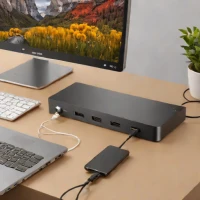
description OWC Thunderbolt 3 Dock Overview
This is a peripheral, but it's crucial for maximizing external storage potential. A high-quality Thunderbolt dock allows you to connect multiple high-speed external SSDs, monitors, and peripherals through a single cable connection to your laptop. It solves the 'too many ports' problem, effectively turning a portable machine into a full desktop workstation.
help OWC Thunderbolt 3 Dock FAQ
How many ports and how much charging does the OWC Thunderbolt 3 Dock provide?
The OWC 14-Port Thunderbolt Dock provides 14 ports and up to 85 W of notebook and device charging. It is intended to turn one Thunderbolt connection into a desk setup for drives, displays, networking, audio, and USB devices. [OWC 14-Port Thunderbolt Dock](https://www.owc.com/solutions/thunderbolt-3-dock-14-port)
Can the OWC Thunderbolt 3 Dock run multiple monitors?
It includes Thunderbolt display support and a dedicated DisplayPort, but resolution and refresh rate depend on the computer, operating system, and connections. OWC also notes that the dock does not support display daisy chains through MST. [OWC dock specifications](https://www.owc.com/solutions/thunderbolt-3-dock-14-port)
Will it work with any USB-C laptop?
No. Full Thunderbolt 3 features require a compatible Thunderbolt port, and an ordinary USB-C port may not support the same displays, storage speeds, or charging. Look for the Thunderbolt logo and verify the laptop model before buying.
Can it safely disconnect external SSDs?
Yes. OWC provides Dock Ejector software that disconnects connected drives in one action after data is written, which is useful for a dock carrying several external SSDs. Always eject active storage before unplugging the host cable. [OWC Dock Ejector information](https://www.owc.com/solutions/thunderbolt-3-dock-14-port)
explore Explore More
Similar to OWC Thunderbolt 3 Dock
See all arrow_forward


Reviews & Comments
Write a Review
Be the first to review
Share your thoughts with the community and help others make better decisions.


