
description OWC Thunderbolt 4 Hub Overview
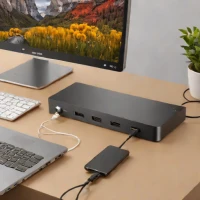
The OWC Thunderbolt 4 Hub provides extensive connectivity options for Mac users. This compact device expands a single Thunderbolt 4 port on a MacBook Pro to include three additional Thunderbolt 4 ports and one USB-C port. It’s notable for its streamlined desktop setup, offering professionals and creatives the ability to seamlessly connect external displays, storage devices, and other peripherals without clutter. It is particularly useful for those working with high-bandwidth workflows demanding multiple connections.
help OWC Thunderbolt 4 Hub FAQ
Can the OWC Thunderbolt 4 Hub support dual 4K displays at 60Hz on a Mac?
Yes, the OWC Thunderbolt 4 Hub is fully capable of supporting dual 4K displays running at 60Hz, or a single 6K display, depending on your Mac's capabilities. It expands a single Thunderbolt 4 port on your MacBook Pro into three additional downstream Thunderbolt 4 ports. This makes it incredibly easy to set up a streamlined, multi-monitor desktop workstation.
Does this hub require a separate power supply, or is it bus-powered?
The OWC Thunderbolt 4 Hub requires its own included external power supply; it is not bus-powered. This is because it needs to provide up to 15W of power to downstream devices through its Thunderbolt ports. The external power brick is necessary to maintain stable high-speed data transfers and peripheral connectivity.
What is the maximum charging speed for a laptop connected to the OWC TB4 Hub?
When you plug your laptop into the designated upstream Thunderbolt 4 port on the OWC Hub, it can deliver up to 60W of power delivery. This is sufficient to charge a 13-inch or 14-inch MacBook Pro during regular use, though a 16-inch MacBook Pro may drain under heavy load. It eliminates the need for a separate proprietary laptop charger on your desk.
Will this hub work with older Thunderbolt 3 devices and cables?
Yes, Thunderbolt 4 is entirely backward compatible with Thunderbolt 3 and standard USB-C devices. You can use your older TB3 hard drives and displays with this OWC hub without any issue. However, to achieve the maximum 40Gbps data transfer rates, you must use certified Thunderbolt 4 cables.
explore Explore More
Similar to OWC Thunderbolt 4 Hub
compare_arrows Compare: Anker PowerExpand 13-in-1 Th... See all arrow_forward

Reviews & Comments
Write a Review
Be the first to review
Share your thoughts with the community and help others make better decisions.


