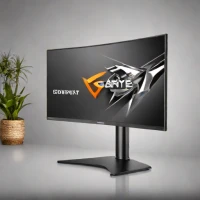
description Philips 345B1C Overview
The Philips 345B1C is a feature-rich 34-inch curved ultrawide (VA panel) that includes a unique integrated pop-up webcam, ideal for hybrid developers. Its USB-C hub provides 65W PD and data connectivity. A built-in KVM switch allows easy control of two systems. While the VA panel offers high contrast, its viewing angles and color accuracy are slightly behind IPS.
This monitor is a great all-in-one solution for programmers who frequently jump between coding and video calls and want a tidy desk.
info Philips 345B1C Specifications
| Size | 34 inches |
| Panel Type | VA |
| Resolution | QHD+ (3440 x 1440) |
| Connectivity | HDMI, DisplayPort, USB-C PD |
| Refresh Rate | 120Hz |
| Response Time | 5ms |
balance Philips 345B1C Pros & Cons
- 34-inch curved ultrawide VA panel
- Integrated pop-up webcam with privacy shutter
- 65W USB-C PD hub and data connectivity
- Built-in KVM switch for easy system control
- VA panel may not offer the same color accuracy as IPS panels
- Higher price point compared to non-34-inch monitors
- Limited input options (only one HDMI port)
help Philips 345B1C FAQ
What is the resolution of the Philips 345B1C?
The monitor has a QHD+ resolution of 3440 x 1440 pixels.
Can I use multiple USB-C devices with this monitor?
Yes, it supports up to two USB-C devices for data and power delivery.
Is the KVM switch compatible with all operating systems?
The KVM switch is designed to work seamlessly with Windows 10/11 and macOS.
What is Philips 345B1C?
The Philips 345B1C is a feature-rich 34-inch curved ultrawide (VA panel) that includes a unique integrated pop-up webcam, ideal for hybrid developers. Its USB-C hub provides 65W PD and data connectivity. A built-in KVM switch allows easy control of two systems. While the VA panel offers high contrast, its viewing angles and color accuracy are slightly behind IPS. This monitor is a great all-in-one solution for programmers who frequently jump between coding and video calls and want a tidy desk.
How good is Philips 345B1C?
How much does Philips 345B1C cost?
What are the best alternatives to Philips 345B1C?
What is Philips 345B1C best for?
Developers who require a large workspace and need multiple system control in a single monitor.
How does Philips 345B1C compare to Samsung Odyssey Neo G9 G95NA (2023)?
Is Philips 345B1C worth it in 2026?
What are the key specifications of Philips 345B1C?
- Size: 34 inches
- Panel Type: VA
- Resolution: QHD+ (3440 x 1440)
- Connectivity: HDMI, DisplayPort, USB-C PD
- Refresh Rate: 120Hz
- Response Time: 5ms
explore Explore More
Similar to Philips 345B1C
See all arrow_forwardformat_list_numbered Lists featuring Philips 345B1C
Reviews & Comments
Write a Review
Be the first to review
Share your thoughts with the community and help others make better decisions.