
description Remarkable 2 Marker Plus Overview
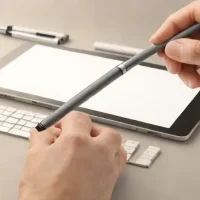
Designed for the reMarkable 2 paper tablet, Marker Plus supports handwriting and sketching with pressure and tilt sensitivity. Its writing feel depends on the interaction between the pen tip and the tablet's textured display. The main difference from the standard Marker is the built-in eraser at the opposite end, allowing marks to be removed with a familiar pen-flipping gesture. It suits focused note-taking, handwritten document review and light drawing within the reMarkable system.
Magnetic attachment keeps it with the tablet, and it does not need charging. The appeal is a simple writing tool with an integrated eraser, rather than a separate upgrade to the tablet's drawing capabilities. Pressure and tilt recognition are also available on the standard Marker.
help Remarkable 2 Marker Plus FAQ
What is the difference between the reMarkable Marker and Marker Plus?
The Marker Plus adds a built-in eraser on the back end, while the standard Marker does not. Both are passive EMR-style pens for the reMarkable 2, so they do not need charging or Bluetooth pairing.
Does the reMarkable 2 Marker Plus work with the original reMarkable tablet?
The Marker Plus is designed for the reMarkable 2. Some EMR pens can behave similarly across devices, but reMarkable sells the Marker Plus as part of the reMarkable 2 accessory ecosystem.
Do Marker Plus tips wear out?
Yes. The Marker Plus uses replaceable nibs, and the paper-like friction of the reMarkable 2 screen is part of why they wear down over time. Heavy note takers usually keep spare tips because the feel changes once a nib becomes rounded.
Is the Marker Plus better for drawing than the regular Marker?
The writing and drawing feel is very similar because both use the same tablet surface and pressure-sensitive input. The practical advantage of the Marker Plus is the rear eraser, which is useful in reMarkable notebooks and sketching workflows.
explore Explore More



Reviews & Comments
Write a Review
Be the first to review
Share your thoughts with the community and help others make better decisions.


