
description Ricoh IM C3500 Overview
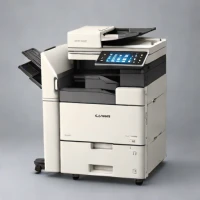
The Ricoh IM C3500 is a staple in the enterprise world, known for its reliability and ease of use. It provides high-quality color output with a focus on user experience, featuring a large touchscreen that simplifies complex tasks.
The machine is built to handle consistent daily workloads without sacrificing print quality. Its ability to integrate with various network environments makes it a versatile choice for diverse business needs.
help Ricoh IM C3500 FAQ
What is the print speed of the Ricoh IM C3500 color laser printer?
The Ricoh IM C3500 is designed for enterprise environments and outputs up to 35 pages per minute in both color and black and white. This makes it a highly capable machine for consistent daily office workflows without bottlenecking print queues. It features a large 10.1-inch touchscreen that simplifies the operation of these high-speed tasks.
Does the Ricoh IM C3500 support mobile printing standards like Apple AirPrint?
Yes, the IM C3500 natively supports Apple AirPrint, Google Cloud Print, and Ricoh's own Smart Device Connector app. This allows employees to print directly from their smartphones or tablets without needing to install dedicated printer drivers. It connects seamlessly via standard enterprise Wi-Fi or Gigabit Ethernet.
Can I scan directly to email or network folders with this Ricoh copier?
The IM C3500 features a Single Pass Document Feeder (SPDF) that allows users to scan directly to email, SMB network folders, or USB drives. You can also integrate it with cloud services like Google Drive or Microsoft OneDrive. The large, intuitive touchscreen interface makes selecting these scan destinations incredibly easy for office staff.
What type of security features does the Ricoh IM C3500 offer for corporate networks?
As an enterprise-grade machine, the IM C3500 includes robust security features like user authentication, data encryption, and hard drive overwrite capabilities. Administrators can restrict access by department or individual user to protect sensitive corporate documents. This ensures the printer complies with strict modern data privacy policies.
explore Explore More


Reviews & Comments
Write a Review
Be the first to review
Share your thoughts with the community and help others make better decisions.


