
description Bamboo Stylus Studio Overview
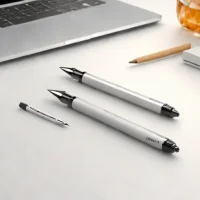
The Bamboo Stylus Studio is a high-precision stylus designed for digital artists and creative professionals. Its notable feature is the 2048 level pressure sensitivity offering nuanced control over brushstrokes and line weight. This makes it ideal for graphic design illustration and digital art creation, particularly with Wacom tablets.
It’s suitable for those requiring accurate input and responsive performance in professional workflows.
help Bamboo Stylus Studio FAQ
What is the pressure sensitivity of the Bamboo Stylus Studio?
The Bamboo Stylus Studio is designed specifically for digital artists, offering highly nuanced control with its 2048 levels of pressure sensitivity. This allows creators to dynamically adjust brushstrokes and line weight based on how hard they press. It is an ideal tool for graphic design illustration and sketching.
Who is the target audience for the Bamboo Stylus Studio?
The Bamboo Stylus Studio is explicitly targeted at creative professionals, illustrators, and digital artists who require high precision in their workflows. Its advanced pressure sensitivity makes it perfect for nuanced tasks like shading and detailed line work in graphic design. It bridges the gap between traditional drawing and digital software.
Is the Bamboo Stylus Studio compatible with all tablets?
The Bamboo Stylus Studio is designed to work specifically with Wacom's compatible pen tablets and smartpads, rather than standard capacitive touchscreens like an iPad. Because it relies on Wacom's proprietary active EMR technology, it requires a compatible digitizer to function. Users must verify their device's compatibility before purchasing.
Does the Bamboo Stylus Studio support tilt functionality?
Yes, alongside its 2048 pressure levels, the Bamboo Stylus Studio is engineered to support natural tilt functionality for realistic brush emulation. This means artists can angle the pen to create broad, shaded strokes, much like a traditional graphite pencil. The stylus offers a highly tactile and responsive drawing experience.
explore Explore More
Similar to Bamboo Stylus Studio
ui.x_see_all arrow_forward


Reviews & Comments
Write a Review
Be the first to review
Share your thoughts with the community and help others make better decisions.


