zoom_in Click to enlarge

Gigabyte M28U

8.7
Very Good
From $449
language

description Gigabyte M28U Overview

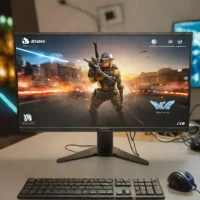
The Gigabyte M28U is the king of value for 4K gaming. It provides a 144Hz refresh rate, HDMI 2.1 support for next-gen consoles, and a sharp 28-inch 4K panel at a price point that undercuts most competitors.

It is the perfect monitor for gamers who want to experience high-resolution gaming without spending over a thousand dollars. While it lacks the deep contrast of OLED, its IPS panel offers great color accuracy and viewing angles. It is a highly recommended choice for anyone looking for a balanced, high-performance display for both PC and console gaming.

info Gigabyte M28U Specifications

balance Gigabyte M28U Pros & Cons

thumb_up Pros
  • check 28-inch 4K IPS panel delivers sharp 157 PPI pixel density for immersive gaming
  • check HDMI 2.1 ports enable full 4K@120Hz output for PS5 and Xbox Series X
  • check 144Hz refresh rate with FreeSync Premium Pro ensures smooth, tear-free gameplay
  • check Built-in KVM switch allows easy control of two devices with single keyboard/mouse
  • check USB-C connectivity with 18W power delivery simplifies cable management
  • check Competitive pricing undercuts most 4K 144Hz gaming monitor alternatives
thumb_down Cons
  • close HDR400 certification limits true HDR experience with only 300 nits brightness
  • close No height adjustment on stand limits ergonomic positioning flexibility
  • close No built-in speakers requires external audio solution
  • close Some reports of minor backlight bleed on dark scenes
  • close Factory calibration not as precise as professional monitors for color-critical work

help Gigabyte M28U FAQ

Does the Gigabyte M28U support 4K 120Hz on PS5 and Xbox Series X?

Yes, both HDMI 2.1 ports on the M28U support 4K@120Hz, making it fully compatible with current-generation consoles. The monitor automatically detects and optimizes settings for connected gaming devices.

Is the built-in KVM switch useful for multi-device setups?

The M28U features a built-in KVM switch that lets you connect two computers and control both with one keyboard and mouse. Switching between devices is quick via monitor controls, ideal for work and gaming setups.

How does HDR performance compare on this monitor?

With DisplayHDR 400 certification and 300 nits peak brightness, HDR content appears marginally better than SDR. The limited brightness and lack of full array dimming mean this isn't a true HDR experience, but SDR content looks excellent.

Does this monitor support NVIDIA G-Sync?

While primarily tested with AMD FreeSync Premium Pro, the M28U is confirmed to work with NVIDIA G-Sync compatible mode via DisplayPort, allowing smooth variable refresh rate gameplay with NVIDIA graphics cards.

What connectivity options are available beyond HDMI?

The monitor includes 2x HDMI 2.1, 1x DisplayPort 1.4, 1x USB-C with 18W PD, 3x USB 3.0 downstream ports, and a 3.5mm audio jack for comprehensive device connectivity.

What is Gigabyte M28U?
The Gigabyte M28U is the king of value for 4K gaming. It provides a 144Hz refresh rate, HDMI 2.1 support for next-gen consoles, and a sharp 28-inch 4K panel at a price point that undercuts most competitors. It is the perfect monitor for gamers who want to experience high-resolution gaming without spending over a thousand dollars. While it lacks the deep contrast of OLED, its IPS panel offers great color accuracy and viewing angles. It is a highly recommended choice for anyone looking for a balanced, high-performance display for both PC and console gaming.
How good is Gigabyte M28U?
Gigabyte M28U scores 8.7/10 (Very Good) on Lunoo, making it a well-rated option in the Monitor category. The Gigabyte M28U earns 8.8/10 due to its exceptional value proposition, combining 4K resolution, 144Hz refresh, and HDMI 2.1 at a price well below co...
How much does Gigabyte M28U cost?
From $449. Visit the official website for the most up-to-date pricing.
What are the best alternatives to Gigabyte M28U?
See our alternatives page for Gigabyte M28U for a ranked list with scores. Top alternatives include: ASUS ROG Swift PG32UCDM, Samsung Odyssey Neo G9, BenQ PD3220U.
How does Gigabyte M28U compare to ASUS ROG Swift PG32UCDM?
See our detailed comparison of Gigabyte M28U vs ASUS ROG Swift PG32UCDM with scores, features, and an AI-powered verdict.
Is Gigabyte M28U worth it in 2026?
With a score of 8.7/10, Gigabyte M28U is highly rated in Monitor. See all Monitor ranked.
What are the key specifications of Gigabyte M28U?
  • HDR: DisplayHDR 400
  • USB-C: 1x USB-C (18W Power Delivery)
  • Weight: 5.18 kg
  • USB Hub: 3x USB 3.0
  • Brightness: 300 nits (typical)
  • HDMI Ports: 2x HDMI 2.1

Reviews & Comments

Write a Review

lock

Please sign in to share your review

rate_review

Be the first to review

Share your thoughts with the community and help others make better decisions.

Save to your list

Create your first list and start tracking the tools that matter to you.

Track favorites
Get updates
Compare scores

Already have an account? Sign in

Compare Items

See how they stack up against each other

Comparing
VS
Select 1 more item to compare