
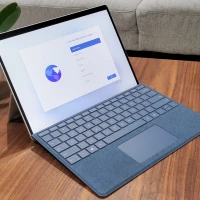
description Microsoft Surface Pro 10 (High-End Config) Overview
For users who cannot compromise on a full desktop operating system experience, the Surface Pro 10 remains a powerhouse. Running Windows, it allows seamless integration with professional desktop software suites like the full Adobe Creative Cloud or specialized engineering tools. It functions more like a portable PC than a dedicated tablet, making it ideal for corporate environments.
help Microsoft Surface Pro 10 (High-End Config) FAQ
Is the Surface Pro 10 a Windows tablet or an iPad competitor?
The Surface Pro 10 is a Windows 2-in-1, so it runs desktop Windows applications rather than iPadOS apps. That makes it better suited for workflows that need full Microsoft Office, Adobe desktop software, or Windows-only business tools.
What makes the high-end Surface Pro 10 configuration different?
High-end configurations typically add more RAM, more storage, and faster Intel Core Ultra processor options compared with base models. Those upgrades matter for multitasking, large browser sessions, and heavier professional apps.
Does the Surface Pro 10 include the keyboard and pen?
Surface Pro devices are commonly sold as tablets first, with the keyboard cover and Surface Slim Pen often sold separately or bundled by retailers. Buyers should check the exact SKU because accessories can change the real total price substantially.
Who is the Surface Pro 10 best for compared with a normal laptop?
It is strongest for people who need pen input, tablet mode, and a full Windows desktop in one device. A traditional laptop like a ThinkPad or MacBook is usually more comfortable for all-day typing on a lap.
explore Explore More
Similar to Microsoft Surface Pro 10 (High-End Config)
compare_arrows Compare: Apple iPad (10th Generation) See all arrow_forward


Reviews & Comments
Write a Review
Be the first to review
Share your thoughts with the community and help others make better decisions.


