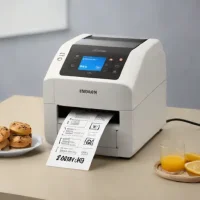
description Rollo Label Printer Overview
The Rollo label printer is a popular choice for its affordability and ease of use. It's a direct thermal printer, meaning it doesn't require ink, reducing ongoing costs. While primarily used for shipping labels, it's versatile enough for other organizational tasks. It connects via USB and supports various label sizes.
While it lacks advanced features like Wi-Fi, its simplicity and reliability make it a solid option for executives who need a straightforward labeling solution. It's compatible with popular e-commerce platforms.
info Rollo Label Printer Specifications
| Weight | 2.6 lbs |
| Dimensions | 9.5 x 7.3 x 5.7 inches |
| Print Speed | 150mm/s (5.9 inches/sec) |
| Connectivity | USB |
| Print Method | Direct Thermal |
| Compatibility | Windows 7/8/10, macOS 10.8+ |
| Max Label Width | 4.1 inches |
| Max Print Width | 4 inches |
| Min Label Width | 1 inch |
| Print Resolution | 203 DPI |
| Label Roll Core Size | 1 inch inner diameter |
| Label Roll Max Outer Diameter | 5 inches |
balance Rollo Label Printer Pros & Cons
- Direct thermal printing eliminates need for ink or toner, reducing ongoing operational costs
- High print speed of up to 150mm/s enables efficient high-volume label production
- Broad platform compatibility including Amazon, eBay, Etsy, Shopify, and ShipStation
- Simple plug-and-play USB setup with straightforward driver installation
- Durable construction with 4.1-inch max label width supporting standard 4x6 shipping formats
- Competitive one-time purchase price makes it budget-friendly for small businesses
- USB-only connectivity limits placement options; no built-in wireless or Bluetooth support
- Direct thermal labels are susceptible to fading when exposed to heat, sunlight, or moisture over time
- Limited to direct thermal label media only, restricting use for documents requiring archival-quality prints
- Manual label loading can be finicky and may cause jams if not properly aligned
- No automatic cutter or peeler included in base model, requiring separate accessories
help Rollo Label Printer FAQ
Does the Rollo label printer require ink or toner to function?
No, the Rollo uses direct thermal printing technology, which heats special thermal paper to create text and images. This eliminates the need for ink cartridges, ribbons, or toner, significantly reducing ongoing costs and maintenance.
What label sizes and types does the Rollo printer support?
The Rollo supports labels up to 4.1 inches wide, including standard 4x6 inch shipping labels, address labels, barcodes, QR codes, and product labels. It works exclusively with direct thermal label rolls.
Is the Rollo compatible with Mac computers and Apple devices?
Yes, the Rollo label printer supports both Windows and Mac operating systems. It includes drivers for Mac installation and works with Mac-compatible shipping platforms like ShipStation and Pirate Ship.
How do I connect the Rollo printer to my computer?
The Rollo connects via USB cable (included) directly to your computer. After downloading the appropriate driver from the Rollo website, the printer is recognized as a standard printer in your operating system.
Can the Rollo print labels directly from Shopify or other e-commerce platforms?
Yes, the Rollo integrates with major e-commerce platforms including Shopify, Amazon, eBay, Etsy, WooCommerce, BigCommerce, and most shipping carriers like UPS, FedEx, and USPS through third-party shipping software.
What is Rollo Label Printer?
How good is Rollo Label Printer?
How much does Rollo Label Printer cost?
What are the best alternatives to Rollo Label Printer?
What is Rollo Label Printer best for?
Small business owners, e-commerce sellers, and home office users who need a reliable, low-cost label printing solution without the ongoing expense of ink or toner.
How does Rollo Label Printer compare to Xerox Select Label Printer?
Is Rollo Label Printer worth it in 2026?
What are the key specifications of Rollo Label Printer?
- Weight: 2.6 lbs
- Dimensions: 9.5 x 7.3 x 5.7 inches
- Print Speed: 150mm/s (5.9 inches/sec)
- Connectivity: USB
- Print Method: Direct Thermal
- Compatibility: Windows 7/8/10, macOS 10.8+
explore Explore More
Similar to Rollo Label Printer
See all arrow_forwardReviews & Comments
Write a Review
Be the first to review
Share your thoughts with the community and help others make better decisions.