zoom_in Click to enlarge

description Wacom Pro Pen 3 Overview

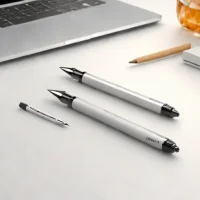
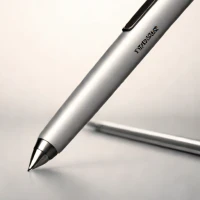
The Wacom Pro Pen 3 is the most customizable stylus on the market, allowing users to adjust weight, grip thickness, and button configuration to suit their specific hand ergonomics. Designed for Wacom's Cintiq Pro line, it offers 8,192 levels of pressure sensitivity and exceptional tilt recognition. It is the industry standard for high-end animation, VFX, and professional illustration. The build quality is industrial-grade, and the lack of a battery means it never needs charging, ensuring it is always ready for long studio sessions.

recommend Best for: The Wacom Pro Pen 3 is ideal for professional digital artists and designers who demand the highest level of precision, customization, and comfort in their creative workflow and utilize Wacom Cintiq Pro displays.

info Wacom Pro Pen 3 Specifications

balance Wacom Pro Pen 3 Pros & Cons

thumb_up Pros
  • check Highly Customizable Ergonomics: Users can adjust the pen's weight, grip thickness, and button configuration for personalized comfort and control.
  • check Exceptional Pressure Sensitivity: Offers 8,192 levels of pressure sensitivity, allowing for incredibly nuanced and realistic digital drawing and painting.
  • check Advanced Tilt Recognition: Provides accurate tilt detection, enabling natural shading and artistic effects mimicking traditional tools.
  • check Premium Build Quality: Constructed with high-quality materials, ensuring durability and a premium feel in the hand.
  • check Seamless Integration with Wacom Cintiq Pro: Designed specifically for Wacom's Cintiq Pro line, guaranteeing optimal compatibility and performance.
  • check Customizable ExpressKeys: Programmable buttons allow for quick access to frequently used shortcuts and commands within creative software.
thumb_down Cons
  • close Limited Compatibility: Primarily designed for Wacom Cintiq Pro displays, limiting its use with other tablets or devices.
  • close Higher Price Point: The Pro Pen 3 is a premium stylus and carries a higher price tag compared to more basic pen options.
  • close Requires Wacom Driver Software: Full functionality relies on Wacom's driver software, which can occasionally experience compatibility issues or updates.
  • close Weight Customization Can Be Complex: While customizable, adjusting the pen's weight and grip can be a somewhat involved process.
  • close No Included Replacement Nibs: Users need to purchase replacement nibs separately, adding to the overall cost of ownership.

help Wacom Pro Pen 3 FAQ

What Wacom displays are compatible with the Pro Pen 3?

The Wacom Pro Pen 3 is specifically designed for the Wacom Cintiq Pro line (16, 24, and 32 models). While it may function with older Wacom displays, full functionality is not guaranteed.

How do I adjust the weight of the Pro Pen 3?

The Pro Pen 3 utilizes a modular design. You can adjust the weight by removing or adding small weights located within the pen's body. Detailed instructions are available in the user manual.

Can I customize the button assignments on the Pro Pen 3?

Yes, the Pro Pen 3's buttons are fully customizable through the Wacom Desktop Center software. You can assign different functions and shortcuts to each button based on your preferences and software.

What is the pressure sensitivity range of the Pro Pen 3?

The Pro Pen 3 boasts an impressive 8,192 levels of pressure sensitivity, providing a wide range of control for varying line thickness and opacity in digital artwork.

What is Wacom Pro Pen 3?
The Wacom Pro Pen 3 is the most customizable stylus on the market, allowing users to adjust weight, grip thickness, and button configuration to suit their specific hand ergonomics. Designed for Wacom's Cintiq Pro line, it offers 8,192 levels of pressure sensitivity and exceptional tilt recognition. It is the industry standard for high-end animation, VFX, and professional illustration. The build quality is industrial-grade, and the lack of a battery means it never needs charging, ensuring it is always ready for long studio sessions.
How good is Wacom Pro Pen 3?
Wacom Pro Pen 3 scores 9.8/10 (Brilliant) on Lunoo, making it one of the highest-rated options in the Digital Pen category. The Wacom Pro Pen 3 earns a score of 9.6/10 due to its unparalleled level of customization and exceptional performance. While the price and limited co...
How much does Wacom Pro Pen 3 cost?
From $129.95. Visit the official website for the most up-to-date pricing.
What are the best alternatives to Wacom Pro Pen 3?
See our alternatives page for Wacom Pro Pen 3 for a ranked list with scores. Top alternatives include: Samsung S Pen (Latest Generation), Huion PW517, Wacom Intuos Pro (with Pen).
What is Wacom Pro Pen 3 best for?

The Wacom Pro Pen 3 is ideal for professional digital artists and designers who demand the highest level of precision, customization, and comfort in their creative workflow and utilize Wacom Cintiq Pro displays.

How does Wacom Pro Pen 3 compare to Samsung S Pen (Latest Generation)?
See our detailed comparison of Wacom Pro Pen 3 vs Samsung S Pen (Latest Generation) with scores, features, and an AI-powered verdict.
Is Wacom Pro Pen 3 worth it in 2026?
With a score of 9.8/10, Wacom Pro Pen 3 is highly rated in Digital Pen. See all Digital Pen ranked.
What are the key specifications of Wacom Pro Pen 3?
  • Material: Aluminum, Rubber
  • Dimensions: 162.4 x 8.8 x 19.2 mm
  • Connectivity: Bluetooth (for button customization and firmware updates)
  • Compatibility: Wacom Cintiq Pro series
  • Tilt Recognition: ±60°
  • Weight Adjustment: Modular weight system (adjustable from 25g to 37g)

Reviews & Comments

Write a Review

lock

Please sign in to share your review

rate_review

Be the first to review

Share your thoughts with the community and help others make better decisions.

Save to your list

Create your first list and start tracking the tools that matter to you.

Track favorites
Get updates
Compare scores

Already have an account? Sign in

Compare Items

See how they stack up against each other

Comparing
VS
Select 1 more item to compare